# CardJs
A simple, clean, credit card form for your website. Includes number formatting, validation and automatic card type detection.
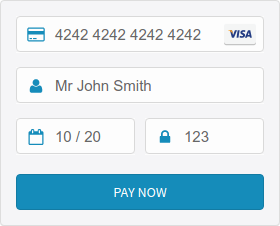
[View working example >](https://cardjs.co.uk/)
# Installation
- Bower: `bower install card-js --save`
- Zip: [Download](https://github.com/CardJs/CardJs/archive/master.zip)
You will need to include both `card-js.min.js` and `card-js.min.css` into your web page.
# Usage
For working examples of using CardJs, see the [examples](examples) folder of this project.
## Automatic Insertion
Any elements with the class `card-js` will be automatically converted into a basic credit card input with the expiry date and CVC check.
The easiest way to get started with CardJs is to insert the snippet of code:
```html
```
## Manual Insertion
If you wish to manually alter the fields used by CardJs to add additional classes or set the input field name or id etc,
you can pre-populate the form fields as show below.
```html
```
# Reading Values
CardJs provides functionality allowing you to read the form field values directly with JavaScript. This can be useful if
you wish to submit the values via Ajax.
Create a CardJs element and give it a unique id (in this example `my-card`)
```html
```
The javascript below demonstrates how to read each value of the form into local variables.
```javascript
var myCard = $('#my-card');
var cardNumber = myCard.CardJs('cardNumber');
var cardType = myCard.CardJs('cardType');
var name = myCard.CardJs('name');
var expiryMonth = myCard.CardJs('expiryMonth');
var expiryYear = myCard.CardJs('expiryYear');
var cvc = myCard.CardJs('cvc');
```
# Functions
To call a function on a CardJs element, follow the pattern below.
Replace the text 'function' with the name of the function you wish to call.
```javascript
$('#my-card').CardJs('function')
```
The functions available are listed below:
| Function | Description |
| :---------- | :--------------------------------------------- |
| cardNumber | Get the card number entered |
| cardType | Get the type of the card number entered |
| name | Get the name entered |
| expiryMonth | Get the expiry month entered |
| expiryYear | Get the expiry year entered |
| cvc | Get the CVC entered |
## CardType Function
The `cardType` function will return one of the following strings based on the card number entered.
If the card type cannot be determined an empty string will be given instead.
| Card Type |
| :--------------------- |
| AMEX |
| Diners |
| Diners - Carte Blanche |
| Discover |
| JCB |
| Mastercard |
| Visa |
| Visa Electron |
# Static functions
If you just want to perform simple operations without the CardJs form, there are a number of static functions provided
by the CardJs library that are made available.
## Card Type from Card Number
```javascript
var cardNumber = '4242 4242 4242 4242'; // Spacing is not important
var cardType = CardJs.cardTypeFromNumber(cardNumber);
```
## Cleaning and Masking
```javascript
// var formatMask = 'XXXX XXXX XXXX XXXX'; // You can manually define an input mask
// var formatMask = 'XX+X X XXXX XXXX XXXX'; // You can add characters other than spaces to the mask
var formatMask = CardJs.CREDIT_CARD_NUMBER_VISA_MASK; // Or use a standard mask.
var cardNumber = '424 2424242 42 42 42';
var cardNumberWithoutSpaces = CardJs.numbersOnlyString(cardNumber);
var formattedCardNumber = CardJs.applyFormatMask(cardNumberWithoutSpaces, formatMask);
```
### Masks
| Variable Name | Mask
| :---------------------------------------- | :------------------ |
| CardJs.CREDIT_CARD_NUMBER_DEFAULT_MASK | XXXX XXXX XXXX XXXX |
| CardJs.CREDIT_CARD_NUMBER_VISA_MASK | XXXX XXXX XXXX XXXX |
| CardJs.CREDIT_CARD_NUMBER_MASTERCARD_MASK | XXXX XXXX XXXX XXXX |
| CardJs.CREDIT_CARD_NUMBER_DISCOVER_MASK | XXXX XXXX XXXX XXXX |
| CardJs.CREDIT_CARD_NUMBER_JCB_MASK | XXXX XXXX XXXX XXXX |
| CardJs.CREDIT_CARD_NUMBER_AMEX_MASK | XXXX XXXXXX XXXXX |
| CardJs.CREDIT_CARD_NUMBER_DINERS_MASK | XXXX XXXX XXXX XX |
# Card Expiry Validation
The expiry month can be in the range: 1 = January to 12 = December
```javascript
var month = 3;
var year = 2019;
var valid = CardJs.isExpiryValid(month, year);
```
The expiry month and year can be either and integer or a string.
```javascript
var month = "3";
var year = "2019";
var valid = CardJs.isExpiryValid(month, year);
```
The expiry year can be either 4 digits or 2 digits long.
```javascript
var month = "3";
var year = "19";
var valid = CardJs.isExpiryValid(month, year);
```
# License
CardJs is released under the MIT license. [View license](https://github.com/CardJs/CardJs/blob/master/LICENSE.md)